Index
從異世界歸來的第二七天 - Kubernetes Autoscaling (三) - Vertical Pod Autoscaler
VPA 元件以及運作流程
VPA 運作流程只要由三個主要的元件主成:
Recommender:
- 監控資源利用值並且計算預估值。
- 查看指標歷史記錄並且根據設定要求的調整
requests/limits
Updater:
- 驅逐那些需要更新的
Pod(因為更新requests/limits必須重啟服務)。 - 如果定義了
updateMode: Auto,Recommender 推薦的任何內容都會觸發 Updater 去驅逐 Pod。
Admission Controller:
- Updater 驅逐 Pod 後並且在 Deployment 重新建立 Pod 前,將會透過 Webhook 觸發 Admission Controller 去更新該
requests/limits。
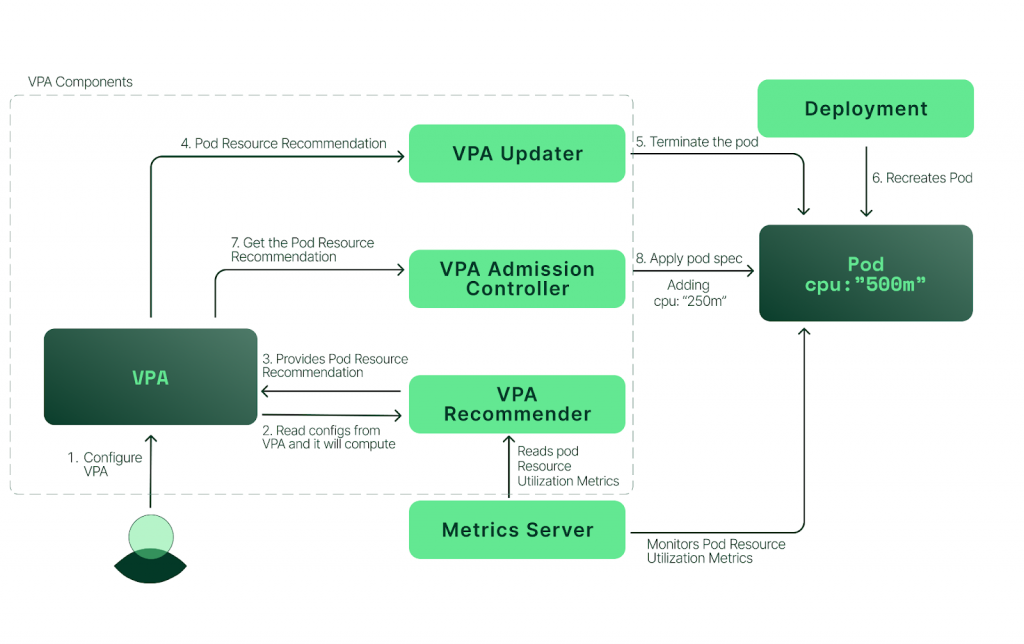
從上圖我們可以清楚的理解三個元件彼此互動的模式。
安裝 Customer Resource - Autoscaler
由於官方內建的 API 只有支援 HPA 而已,所以如果我們需要使用到 cluster autoscaler 或者是 vertical autoscaler 等 CRD 時,需要以模組的方式載入。
下載官方 autoscaler repo 並進入 VPA 檔案路徑:
git clone git@github.com:kubernetes/autoscaler.git

cd ./autoscaler/vertical-pod-autoscaler
執行安裝檔:
./hack/vpa-up.sh
-------
customresourcedefinition.apiextensions.k8s.io/verticalpodautoscalercheckpoints.autoscaling.k8s.io created
customresourcedefinition.apiextensions.k8s.io/verticalpodautoscalers.autoscaling.k8s.io created
clusterrole.rbac.authorization.k8s.io/system:metrics-reader created
clusterrole.rbac.authorization.k8s.io/system:vpa-actor created
clusterrole.rbac.authorization.k8s.io/system:vpa-checkpoint-actor created
clusterrole.rbac.authorization.k8s.io/system:evictioner created
clusterrolebinding.rbac.authorization.k8s.io/system:metrics-reader created
clusterrolebinding.rbac.authorization.k8s.io/system:vpa-actor created
clusterrolebinding.rbac.authorization.k8s.io/system:vpa-checkpoint-actor created
clusterrole.rbac.authorization.k8s.io/system:vpa-target-reader created
clusterrolebinding.rbac.authorization.k8s.io/system:vpa-target-reader-binding created
clusterrolebinding.rbac.authorization.k8s.io/system:vpa-evictionter-binding created
serviceaccount/vpa-admission-controller created
clusterrole.rbac.authorization.k8s.io/system:vpa-admission-controller created
clusterrolebinding.rbac.authorization.k8s.io/system:vpa-admission-controller created
clusterrole.rbac.authorization.k8s.io/system:vpa-status-reader created
clusterrolebinding.rbac.authorization.k8s.io/system:vpa-status-reader-binding created
serviceaccount/vpa-updater created
deployment.apps/vpa-updater created
serviceaccount/vpa-recommender created
deployment.apps/vpa-recommender created
Generating certs for the VPA Admission Controller in /tmp/vpa-certs.
Generating RSA private key, 2048 bit long modulus
.+++
..................+++
e is 65537 (0x10001)
unknown option -addext
req [options] <infile >outfile
where options  are
 -inform arg    input format - DER or PEM
 -outform arg   output format - DER or PEM
 -in arg        input file
 -out arg       output file
 -text          text form of request
 -pubkey        output public key
 -noout         do not output REQ
 -verify        verify signature on REQ
 -modulus       RSA modulus
 -nodes         don't encrypt the output key
 -subject       output the request's subject
 -passin        private key password source
 -key file      use the private key contained in file
 -keyform arg   key file format
 -keyout arg    file to send the key to
 -newkey rsa:bits generate a new RSA key of 'bits' in size
 -newkey dsa:file generate a new DSA key, parameters taken from CA in 'file'
 -newkey ec:file generate a new EC key, parameters taken from CA in 'file'
 -[digest]      Digest to sign with (md5, sha1, md4)
 -config file   request template file.
 -subj arg      set or modify request subject
 -multivalue-rdn enable support for multivalued RDNs
 -new           new request.
 -batch         do not ask anything during request generation
 -x509          output a x509 structure instead of a cert. req.
 -days          number of days a certificate generated by -x509 is valid for.
 -set_serial    serial number to use for a certificate generated by -x509.
 -newhdr        output "NEW" in the header lines
 -asn1-kludge   Output the 'request' in a format that is wrong but some CA's
                have been reported as requiring
 -extensions .. specify certificate extension section (override value in config file)
 -reqexts ..    specify request extension section (override value in config file)
 -utf8          input characters are UTF8 (default ASCII)
 -nameopt arg    - various certificate name options
 -reqopt arg    - various request text options

ERROR: Failed to create CA certificate for self-signing. If the error is "unknown option -addext", update your openssl version or deploy VPA from the vpa-release-0.8 branch.
deployment.apps/vpa-admission-controller created
service/vpa-webhook created
這時如果出現了 "unknown option -addext" 代表我們需要提升 openssl 版本。
所以我們需要更新 macOS 預設使用的 libressl (openssl 的一個分支)。
首先卸載剛剛安裝:
./hack/vpa-down.sh
使用 brew 更新 libressl:
brew install libressl

echo 'export PATH="/opt/homebrew/opt/libressl/bin:$PATH"' >> ~/.zshrc

source ~/.zshrc
再次執行安裝檔:
./hack/vpa-up.sh
------
customresourcedefinition.apiextensions.k8s.io/verticalpodautoscalercheckpoints.autoscaling.k8s.io created
customresourcedefinition.apiextensions.k8s.io/verticalpodautoscalers.autoscaling.k8s.io created
clusterrole.rbac.authorization.k8s.io/system:metrics-reader created
clusterrole.rbac.authorization.k8s.io/system:vpa-actor created
clusterrole.rbac.authorization.k8s.io/system:vpa-checkpoint-actor created
clusterrole.rbac.authorization.k8s.io/system:evictioner created
clusterrolebinding.rbac.authorization.k8s.io/system:metrics-reader created
clusterrolebinding.rbac.authorization.k8s.io/system:vpa-actor created
clusterrolebinding.rbac.authorization.k8s.io/system:vpa-checkpoint-actor created
clusterrole.rbac.authorization.k8s.io/system:vpa-target-reader created
clusterrolebinding.rbac.authorization.k8s.io/system:vpa-target-reader-binding created
clusterrolebinding.rbac.authorization.k8s.io/system:vpa-evictionter-binding created
serviceaccount/vpa-admission-controller created
clusterrole.rbac.authorization.k8s.io/system:vpa-admission-controller created
clusterrolebinding.rbac.authorization.k8s.io/system:vpa-admission-controller created
clusterrole.rbac.authorization.k8s.io/system:vpa-status-reader created
clusterrolebinding.rbac.authorization.k8s.io/system:vpa-status-reader-binding created
serviceaccount/vpa-updater created
deployment.apps/vpa-updater created
serviceaccount/vpa-recommender created
deployment.apps/vpa-recommender created
Generating certs for the VPA Admission Controller in /tmp/vpa-certs.
Generating RSA private key, 2048 bit long modulus
..........+++++
....+++++
e is 010001 (0x65537)
Generating RSA private key, 2048 bit long modulus
..................+++++
............................................................+++++
e is 010001 (0x65537)
Signature ok
subject=/CN=vpa-webhook.kube-system.svc
Getting CA Private Key
Uploading certs to the cluster.
secret/vpa-tls-certs created
Deleting /tmp/vpa-certs.
deployment.apps/vpa-admission-controller created
service/vpa-webhook created
查看 VPA 運行狀況:
kubectl get pods -n kube-system | grep vpa
-------
vpa-admission-controller-667dd5b58-jsftm   1/1     Running   0                 84s
vpa-recommender-5f48d76d7-g7x6m            1/1     Running   0                 85s
vpa-updater-6fc5699544-wrvhb               1/1     Running   0                 85s
kubectl api-resources | grep vpa
-------
verticalpodautoscalercheckpoints   vpacheckpoint   autoscaling.k8s.io/v1                  true         VerticalPodAutoscalerCheckpoint
verticalpodautoscalers             vpa             autoscaling.k8s.io/v1                  true         VerticalPodAutoscaler
大功告成!
實戰練習
# deployment.yaml

apiVersion: apps/v1
kind: Deployment
metadata:
  name: hamster
  namespace: default
spec:
  selector:
    matchLabels:
      app: hamster
  replicas: 1
  template:
    metadata:
      labels:
        app: hamster
    spec:
      containers:
        - name: hamster
          image: k8s.gcr.io/ubuntu-slim:0.1
          resources:
            requests:
              cpu: 100m
              memory: 50Mi
            limits:
              cpu: 2000m
              memory: 2Gi
          command: ["/bin/sh"]
          args:
            - "-c"
            - "while true; do timeout 0.2s yes >/dev/null; sleep 0.5s; done"
# vpa.yaml

apiVersion: autoscaling.k8s.io/v1
kind: VerticalPodAutoscaler
metadata:
  name: hamster-vpa
  namespace: default
spec:
  targetRef:
    apiVersion: apps/v1
    kind: Deployment
    name: hamster
  updatePolicy:
    updateMode: "Off"
  resourcePolicy:
    containerPolicies:
      - containerName: '*'
        minAllowed:
          cpu: 100m
          memory: 50Mi
        maxAllowed:
          cpu: 1
          memory: 500Mi
        controlledResources: ["cpu", "memory"]
spec.updatePolic.updateMode :
Off:VPA 只會提供推薦資源配置,不會自動的調整任何設定。Initial:VPA 只會在 Pod 被建立時調整資源配置並且不會再有任何自動調整。Auto:VPA 將會自動配置 Recommender 提供的配置。Recreate:和Auto類似差別在於每次重啟 Pod 都會recreate(很少用到)。
spec.resourcePolicy.containerPolicies :
containerName:指定 VPA 的範圍,*代表目標中所有的 Pod。minAllowed:可調整的資源下限。maxAllowed:可調整的資源上限。controlledResources:需要監控的資源指標,有 cpu 和 memory 可以選擇。
執行配置:
kubectl apply -f ./deployment.yaml -f ./vpa.yaml
----------
deployment.apps/hamster created
verticalpodautoscaler.autoscaling.k8s.io/hamster-vpa created
查看 VPA 給出的配置建議:
kubectl get vpa
----------
NAME          MODE   CPU    MEM       PROVIDED   AGE
hamster-vpa   Auto   379m   262144k   True       2m58s

# 262144K 略等於 255 Mi
查看 VPA 的推薦內容:
kubectl describe vpa hamster-vpa
----------
...
Status:
  Conditions:
    Last Transition Time:  2022-08-28T10:03:36Z
    Status:                True
    Type:                  RecommendationProvided
  Recommendation:
    Container Recommendations:
      Container Name:  hamster
      Lower Bound:
        Cpu:     204m
        Memory:  262144k
      Target:
        Cpu:     379m
        Memory:  262144k
      Uncapped Target:
        Cpu:     379m
        Memory:  262144k
      Upper Bound:
        Cpu:     1
        Memory:  500Mi
Events:          <none>
從 Status.Recommendation 中可以看到幾項值得注意的數值:
Lower Bound:如果Pod 的請求小於下限,則Pod 縱向自動擴縮器會刪除該Pod 並將其替換。Upper Bound:如果Pod 的請求大於上限,則Pod 縱向自動擴縮器會刪除該Pod 並將其替換。Target:該值為再minAllowedmaxAllowed範圍內的推薦值,指定為了使容器以最佳方式運行。Uncapped:不受到minAllowedmaxAllowed規範的推薦值。
移除 VPA 模組
./hack/vpa-down.sh
結論
我們可以利用各種 autoscaler 節省許多不必要的浪費,更可以更多的結合 HPA 和 VPA ,但需要注意的是使用非外部資源指標的 HPA 將會與 VPA 的 Auto 模式互相衝突造成不可預期的問題,所以個人比較偏好使用 HPA 搭配 VPA Off 模式,使用推薦值輔助我的資源配置。
Reference
*Vertical Pod Autoscaling: Example | Metrics | Limits | Vertical Pod Autoscaler | VPA | Kubernetes* https://github.com/antonputra/tutorials/blob/main/lessons/074/1-demo/0-deployment.yaml